I went the other way and originally had everything on my main desktop but then moved it to a separate PC. Then I picked up a GTX 1050 off ebay for cheap to use as a GPU for Plex. The new PC I'm running everything on has better intel graphics than my old one so now I'm using that instead of the 1050Grafo wrote: Mar 19th, '26, 09:27 Right now I'm running things on a HP Compaq 8200, this pc:
For now I'm hosting Calibre, Immich, FreshRSS and a Plex server that I use with my family. Everything is working great but I was thinking on moving everything to my main rig as @Casey did mostly to get advantage of the GPU.
What's your selfhosting setup?
-
the_skotts

- Posts: 71
- Joined: Jan 29th, '26, 04:48
- Pronouns: he\him
- Location: somewhere far too hot
Re: What's your selfhosting setup?
-
bumbervevo

- Posts: 55
- Joined: Jan 29th, '26, 09:43
- Pronouns: He/Him, They/Them
- Location: Inside your computer
- Contact:
Re: What's your selfhosting setup?
That's the exact HP model that I have! I'd been running my server off of this for a good 2 or 3 years before eventually moving to a Supermicro.Grafo wrote: Mar 19th, '26, 09:27 Right now I'm running things on a HP Compaq 8200, this pc:
For now I'm hosting Calibre, Immich, FreshRSS and a Plex server that I use with my family. Everything is working great but I was thinking on moving everything to my main rig as @Casey did mostly to get advantage of the GPU.

I ended up picking up that custom NAS that I was talking about. The guy was cool and had upgraded his setup, so he no longer needed this. It's a pretty nifty little setup and would fit nicely next to my router. Really excited to downsize to this and have my server running locally again!
Image dump
Spoiler


-
skullmeat

- Posts: 65
- Joined: Feb 16th, '26, 13:20
- Location: An ancient unix server in a long forgotten bunker
Re: What's your selfhosting setup?
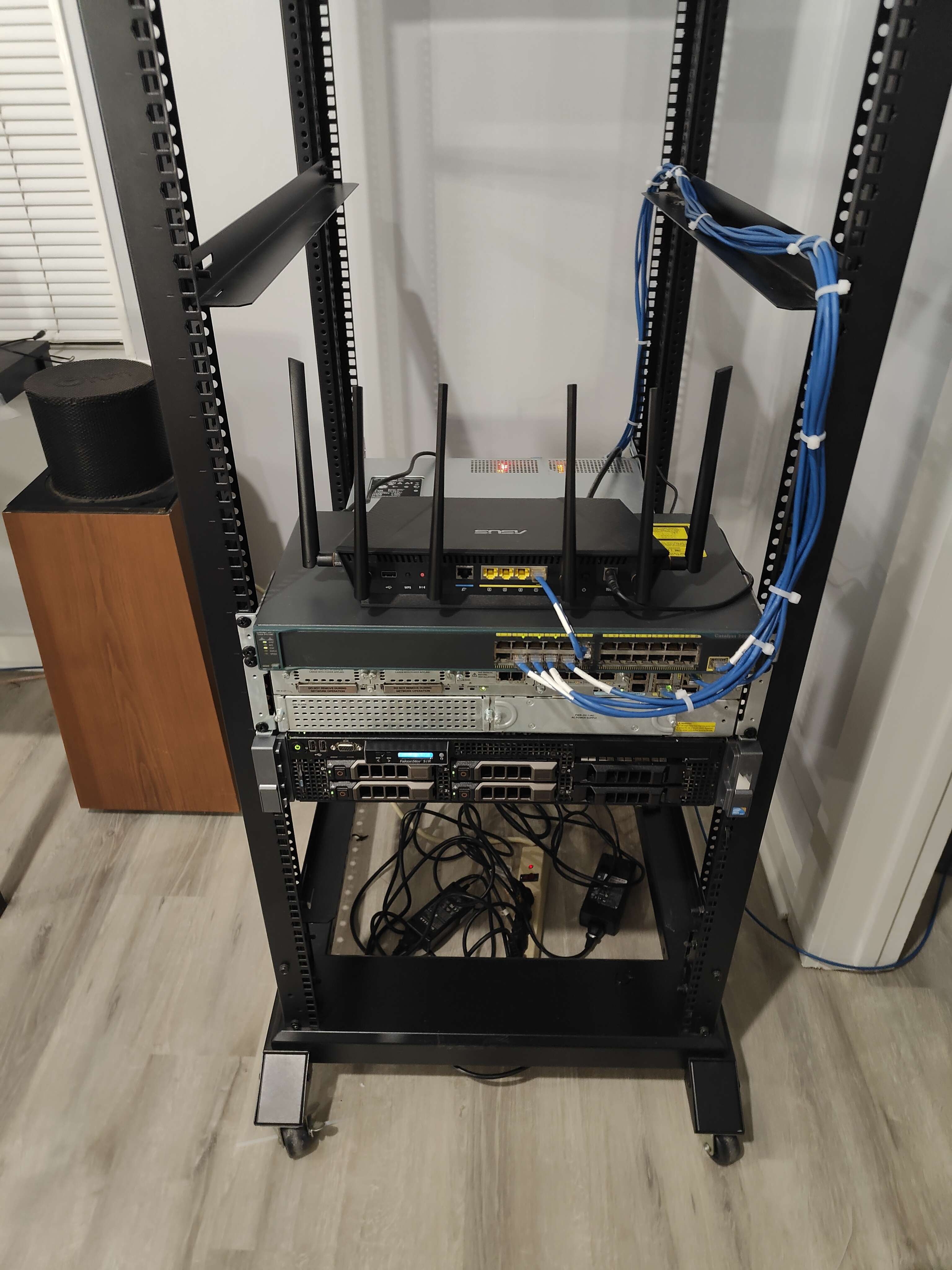
Dell PowerEdge R710
x2 Intel Xenon E5645 @ 2.40 Ghz
144 GB Ram
8 TB Storage
VMware ESXi 6.5
Cisco 2911 ISR
VWIC3-4MFT-T1/E1 - 4-Port RJ-48 Multiflex Trunk (Previous owner installed it, not sure what for)
3rd generation two port FXS DID voice interface daughtercard VIC3-2FXS/DID
PVDM3 DSP DIMM with 16 Channels
Cisco Catalys 2960 24 Port Switch
Asus AX-3000 in AP mode


Re: What's your selfhosting setup?
I'll go through more of these when I'm back from Taiwan. There's a lot to comment on, but I'll leave my quick setup here. I'm currently using my home network because the internet is so slow here in the hotel. I am getting about 10 mb/s most of the time, but it sometimes is around 100 mb/s... no idea why.
OPNsense router
20 Cores and 32GB for VMs... Running:
So, I could likely replace ALL my NAS units and maybe even the Proxmox box with a single UGREEN NAS since their new fancy units have Intel Core Ultra CPUs with plenty of cores and 64GB RAM. The Virtual Machine app is coming along and I have had no issues with any versions of Linux and even got Windows 2000 going without issues. It is not as full-featured as Proxmox, but it could cover most of my needs. I'll probably keep a separate Proxmox box just to separate things, but it could be consolidated.
Anyway, I'll probably simplify this when I move.
Otherwise, I use wireguard to connect to my home network so all my mounts work... and I have access to my music and such. It's also way safer than this damned hotel with it's open network.
OPNsense router
Switches
- 2x Asustor 2.5 GbE switch - 8 port (one in the network closet, one near my main PC area)
- Shitty aliexpress 2.5 GbE - 8 port
this randomly breaks and makes my whole network 100 MB/s. It also has a 10 GbE SFP+ port, but that is a nightmare to use on this unit... It needs to go - Netgear 2.5 GbE switch that is still in the box
- Netgear gigabit switch (24 port, I think)
NAS Units
- Synology DS918+ NAS for Tek videos and work (Four 14 TB Seagate IronWolf Drives in Synology Hybrid Raid)
I had to hack this one by installing a USB 2.5 GbE NIC since Synology only gave me gigabit - ASUSTor AS6704T NAS for Media and Game Projects (Three 18 TB EXOS Drives)
Computers
Proxmox Box: MINISFORUM MS-01 with the Intel i9-12900H20 Cores and 32GB for VMs... Running:
- Debian with Portainer (Wireguard, pihole, nginx proxy manager, freshrss, and a few other apps)
- Debian with Wikijs for a project I'm working on
- Windows 10 LTSC for remote access (and downloading)
So, I could likely replace ALL my NAS units and maybe even the Proxmox box with a single UGREEN NAS since their new fancy units have Intel Core Ultra CPUs with plenty of cores and 64GB RAM. The Virtual Machine app is coming along and I have had no issues with any versions of Linux and even got Windows 2000 going without issues. It is not as full-featured as Proxmox, but it could cover most of my needs. I'll probably keep a separate Proxmox box just to separate things, but it could be consolidated.
Anyway, I'll probably simplify this when I move.
How I Use This While Traveling
I'm in Taiwan now and I am using the Windows 10 LTSC PC more than my laptop (even though I'm using my CachyOS to remote into my LTSC PC). I would rather be just using my laptop, but the internet is SLOW. However, I only need 5-10mb/s to remote into my LTSC rig and then I can browse the web using my home internet connection. Basically I'm using 5-10mb/s to stream my home gigabit connection, and it works well enough. I did install Premiere on the LTSC rig before leaving in case something needs editing or updating, but every time I open it using remote desktop, it crashes. Oh well... guess I can't edit.Otherwise, I use wireguard to connect to my home network so all my mounts work... and I have access to my music and such. It's also way safer than this damned hotel with it's open network.
-
Archmage

- Posts: 86
- Joined: Jan 29th, '26, 10:09
- Pronouns: He/Him
- Location: Aircraft Graveyard, Arizona
- Contact:
Re: What's your selfhosting setup?
Right now I have an Unraid box built running a multitude of various applications.
System Specs:
AMD Ryzen PRO 5650GE
ASRock X570D4U-2L2T
128GB of RAM
Quadro P400 (Plex Transcode)
26TB of flash storage
It started out as a box to run some VMs and a handful of Docker containers while trying to reduce the overall wattage.
It has now ballooned to 10 VMs and about 50 containers. A lot of the container revolve around my media and most of it is automated. Second most would be containers for "smart" house stuff and general home automation. I'm hoping to tie in a power monitoring to further automate things around the house.
Additionally I have a TrueNAS box that mostly acts as a backup for my machines. I also use it to test new software and have a couple of test VMs running on it.
Finally I have a cheap second hand QNAP NAS I use strictly as a backup medium.
System Specs:
AMD Ryzen PRO 5650GE
ASRock X570D4U-2L2T
128GB of RAM
Quadro P400 (Plex Transcode)
26TB of flash storage
It started out as a box to run some VMs and a handful of Docker containers while trying to reduce the overall wattage.
It has now ballooned to 10 VMs and about 50 containers. A lot of the container revolve around my media and most of it is automated. Second most would be containers for "smart" house stuff and general home automation. I'm hoping to tie in a power monitoring to further automate things around the house.
Additionally I have a TrueNAS box that mostly acts as a backup for my machines. I also use it to test new software and have a couple of test VMs running on it.
Finally I have a cheap second hand QNAP NAS I use strictly as a backup medium.
The swarm is supreme! Go home, city slicker.
-
chiefterror

- Posts: 86
- Joined: Feb 12th, '26, 18:57
- Pronouns: they/them
- Location: dark and bloody ground
- Contact:
Re: What's your selfhosting setup?
Finally, my Owncast host is live! Will get to streamin soon.
https://live.chief-chat.org/ - the stream
https://cyberpunk.lol/@chiefterror - my Mastodon acct where I'm gonna post all the schedule/programming stuff.
https://live.chief-chat.org/ - the stream
https://cyberpunk.lol/@chiefterror - my Mastodon acct where I'm gonna post all the schedule/programming stuff.
humans are bastards and i still haven't met my father